 OfficeSimplify for Microsoft Teams
Manage employee leave without leaving Microsoft Teams
Employees request time off in Teams. Managers approve it in one click. Works with Microsoft Teams, Outlook and Microsoft 365, and calendars stay in sync automatically.
30-day free trial · No card needed
- Teams
- Outlook
- Microsoft 365
- Teams mobile

👋 Priya Shah has requested 3 days of Holiday. Your approval is needed.
One app, every Microsoft surface
Book, approve and track leave in Teams, Outlook and Microsoft 365
Install it once from the Teams app store. The same Chat, My Leave and Who's Out tabs then appear wherever your team already works, on desktop, web and mobile.
-
Microsoft Teams
Request leave in a chat with the bot and approve from the card. My Leave and Who's Out sit in tabs beside the chat.
-
Outlook
Open OfficeSimplify Time Off from the Outlook app bar to check allowances or book time off without switching apps.
-
Microsoft 365
Find it in the Microsoft 365 app and on office.com alongside Word, Excel and your other apps.
-
Teams mobile
Approve requests and see who's out this week from the Teams app on iPhone and Android.
Book time off
Request time off from a Teams chat
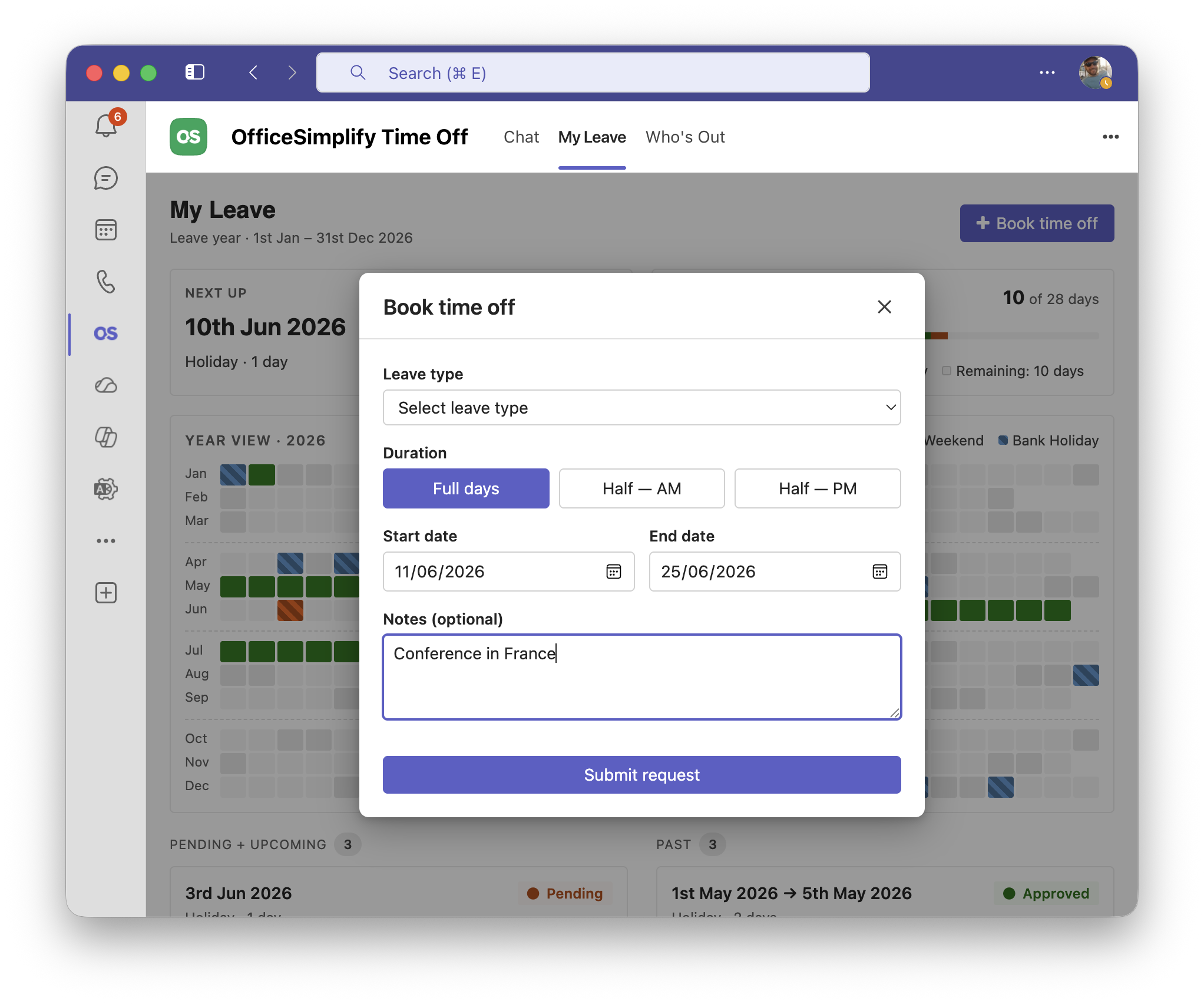
Employees type timeoff to the OfficeSimplify bot or press Request time off. They choose the leave type and dates and see their remaining allowance before sending.
Approvals
Approve leave in one click inside Teams
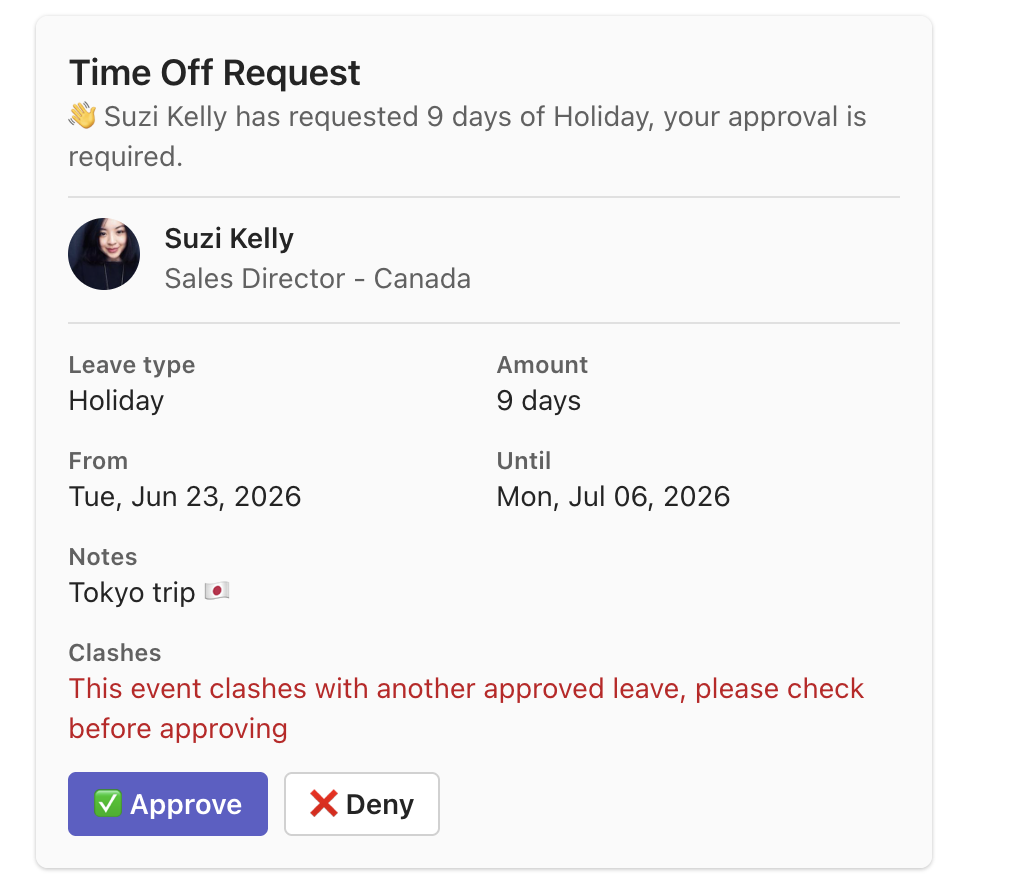
The right manager gets an interactive card with the dates, days left after and any clashes. Approve or decline in the card itself.
Who's out
One shared leave calendar in Teams, always up to date
The Who's Out tab shows how many people are out today and who is away each day, by week or month. Filter by team or country, on desktop or the Teams mobile app.
OfficeSimplify Time Off
My leave tab
Allowances and public holidays in the My leave tab
Each person sees what they have left, what is pending and approved, their booked leave and upcoming public holidays in a Teams tab. It works for fixed allowances and unlimited PTO, so no one has to ask HR how many days they have left.
OfficeSimplify Time Off
Daily report
One daily report: who's away, who's celebrating and public holidays
Each morning OfficeSimplify posts to your channel who is away and when they are back, birthdays and work anniversaries, public holidays in each country, and how many requests are waiting for approval.
🎂 Hannah Cole is celebrating her birthday this week
🎉 Nina Park is celebrating 5 years at the company this week
Status message
Teams status messages set themselves
While someone is on approved leave, their Teams status shows a message such as "Holiday till 25 June". It clears when they return, and you can change the wording for each leave type.
Handing over to Tom while I’m off. Notes are in the doc.
Quick question about the launch
Set up in under 10 minutes
-
1 · About 1 minute
Install OfficeSimplify in Teams
Sign up with your Microsoft work account. No card needed for the 30-day trial.
-
2 · About 2 minutes
Tell us about your company
Your company name, default leave allowance and country, so public holidays and allowances are right from day one.
-
3 · About 5 minutes
Invite your team and go
Invite colleagues from Microsoft 365 with one click. Everyone can type timeoff to the bot straight away.
“Microsoft Teams is where we work, so it's natural that we use it for our time-off requests. Nobody likes logging into another system just to book a holiday, and this bot makes it super easy for everyone to keep track of who's off and when.”
Microsoft Teams time off questions
Your team on Slack instead? See OfficeSimplify for Slack.
Is there a leave management app for Microsoft Teams?
Yes. OfficeSimplify adds a bot and a My leave tab to Microsoft Teams. Employees request time off in a chat, and managers approve from an interactive card.
Does it work in Outlook and Microsoft 365?
Yes. After you install it from the Teams app store, OfficeSimplify Time Off also appears in Outlook and the Microsoft 365 app, with the same My Leave and Who's Out tabs.
Does it sync with Outlook calendars?
Yes. Subscribe to the OfficeSimplify calendar feed in Outlook or Microsoft 365 once, and approved leave appears there and keeps itself up to date.
Does it change Teams status during leave?
Yes. A custom status message is set while someone is on approved leave and cleared when they return.
Is OfficeSimplify in the Microsoft Teams store?
Yes. Microsoft reviews every app before it goes into the Teams store and Microsoft Marketplace. See OfficeSimplify in Microsoft Marketplace.
How much does the Teams app cost?
£3 per employee per month, with every feature included. Start with a 30-day free trial, no card needed.
Can I import my team from Microsoft Teams?
Yes. Import your team when you sign up, or add people later from your dashboard with one click.
Join 1k+ teams who never miss a holiday request
30-day free trial · No card needed · See pricing